Astra S-Nesting - True shape nesting software
|
Key features
|
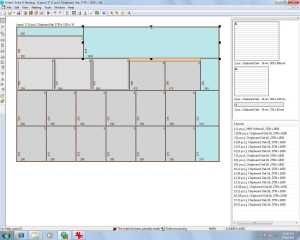
[ View Screenshot ]
|
Astra S-Nesting is intended for optimizing true shape nesting.
The software can be used for cutting parts of metal, fabric, leather, wood, glass, stone and
other sheet materials.
All the features of Astra S-Nesting were designed to make the nesting and cutting process as quick
as possible. Simple and intuitive tools of Astra S-Nesting allow you to quickly create an order,
perform automatic true shape nesting, manually adjust layouts, if needed, print reports, output NC data in
ISO G-codes, ESSI and DXF formats for processing with cutting machine.
|
Preparing an order
Parts are imported from DXF files. A number of properties are specified
for each part: material, thickness, quantity and drawing number.
All these properties can be modified after importing.
An order can contain parts of various thicknesses and materials –
the software will automatically sort parts into nesting groups.
|
True shape nesting
Quick automatic true shape nesting allows the software to perform calculations
with a high material usage ratio. If necessary, layouts can be
edited manually. A number of tools are available for this purpose:
you can move parts in set increments, to the nearest limit stop and
freely move them with your mouse; rotate parts, set part edges in parallel;
scale layouts; undo and redo commands and much more.
|
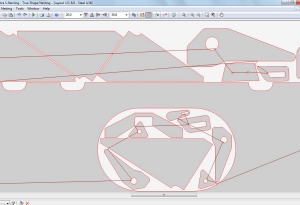
Cutting tool path
The cutting program allows you to: automatic calculate and manually edit cutting tool path
(for laser cutter, plasma cutter etc.), customize postprocessor and output NC-data in ISO (G-codes)
and ESSI formats for CNC cutting machines.
|
Reports
The report generation system creates layout drafts and specifications.
Reports can be exported to Microsoft Word and Acrobat Reader. Layouts are exported into DXF files.
|
Integration with CAD/CAM/ERP systems
Integration with other CAD/CAM/ERP systems is one of the key principles of
Astra S-Nesting software. The data from your CAD/CAM/ERP system can be loaded to Astra S-Nesting,
which will return the results of calculations. The cutting program can be run from command line,
import data automatically, generate the cutting layout of the order and export
the results.
|
|

|